

Course Guides for next year, 2027, are now available online or as a printed copy from the U3A Reception Desk. Enrolment day for members is on Monday 23 November from 9 am and for new members on Wednesday 25 November. New members can enrol the same way as members.
Please read the instructions below on how to enrol.
Enrolling online is fastest
If you want to enrol online but don’t know how, you should join the Zoom session for ‘How to Enrol Online’ on Wednesday 11 November from 1-3pm. You’ll need to book at Reception for this as all online enrolments are now turned off.
Hints for easier online enrolment
- Get prepared:
- Register in Member Wizard: If you haven’t already registered in Member Wizard, do this before enrolment day. “Registration” simply means setting a new password using your member number or email address to identify yourself to the system. (You can find more details on how to Register and use Member Wizard on our website or by getting a handout from Reception.
- Login to Member Wizard and verify your details, especially your email address.
- Make a list of the 2027 classes you want to enrol in.
- Check the limits on your preferred courses:
Restricted courses – means you can only choose one class in each restricted group
| Maximum classes /category | Choose on the first week of enrolment | From Monday 30 November, you can add | Giving a total of |
|---|---|---|---|
| “General” / regular classes | 3 | 5 | 8 |
| Summer School | 5 | 3 | 8 |
| Summer School Cooking Classes | 3 | 2 | 5 |
| Computer classes | 4 | 0 | 4 |
| Short Art classes | 4 | 0 | 4 |
| Short Craft Classes | 3 | 0 | 3 |
- Choose the classes you want to enrol in first. Be sure to enrol in your top preferences first.
- Be aware of Waitlists:
- If you are waitlisted for a “General” class, that will count towards your total enrolment limit.
- Some classes are Wait List Only classes. These are marked with ** at the end of the class name, and also in the description. Initially, everyone joins the waitlist, and the Class Leader chooses who joins.
- There will probably be a rush at 9 am on Monday 23 November for online enrolments. We will do our best to allow everyone to login, but you may need to keep trying.
Note – Do not login before 9 am – if you do, you’ll need to login again after 9.00 am. - Use the Filter and Search. The fastest way to find the courses you want to enrol in is to use Filter and Search. See instructions below.
- Add your chosen courses to your Shopping Cart by clicking the “Enrol Now” or “Join Waiting List” button for each course.
- Remember to Checkout before you close down!
- We recommend you pay online with your credit or debit card using Stripe (which is very safe) – no need for a Stripe account. If you are on waitlists for all your choices, or you prefer to pay at Reception you can do this later. Remember to pay before you attend your first class!
How to use the Filter
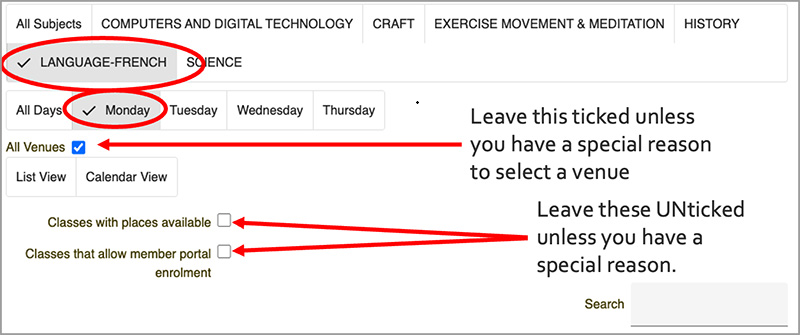
In Member Wizard, on the Classes page, there is a list of class categories and a list of days of the week.
You can select one or more categories or select a day of the week. This will show only the matching classes.
How to use Search
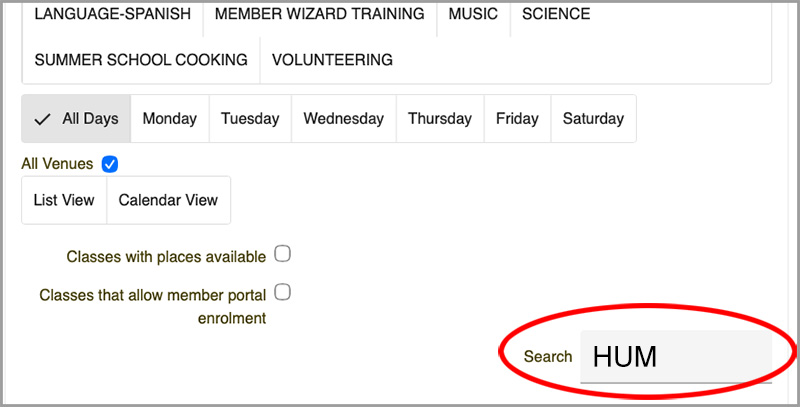
In the Search box (below the filter), type in part of the class code or part of the class name you want. The system will only show those classes with that word. Eg if you search for “Ukul” you will find all the Ukulele classes. If you type in “HUM” you will see all the Humanities classes with the code 27HUM…)
Enrolling in person at The Hub
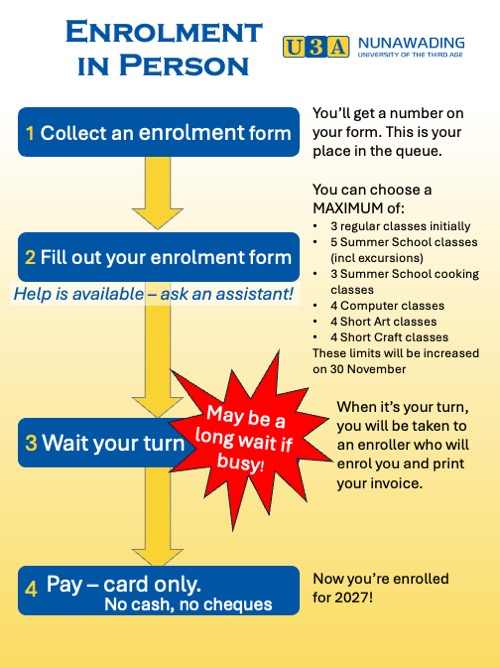
- Make sure you wear your name badge when you come to enrol.
- Join the queue at the Hub from 8:30 am on Monday 23 November, or any day that week.
- Take a number. This is your place in the queue for enrolment. Follow the signs.
- Fill out your enrolment form or bring your completed form. Helpers will be available if you need assistance.
- Wait your turn. There may be a long delay if many people come on the day.
- When your number is called, your enrolment will be processed by one of our team of enrollers.
- If you are accepted into one or more classes, you are expected to pay on the day, by Credit or Debit card only. No cash or cheques accepted.
If you’re going to be away and can’t enrol online
- Collect a form from Reception.
- Complete your enrolment form.
- Lodge your form at the Reception Desk before Monday 23 November.
- Remember your enrolment form will be processed after Monday 23 November.
Fees
The U3A membership fee for 2027 is $70. Some classes have an additional fee for court hire (eg Pickleball). There is no additional fee to attend Summer School for financial members except for class materials, where indicated, or entrance fees for excursions.
More help
During enrolment, there will be helpers available to solve your problems, but only in person at the Hub.
- There is no phone assistance available.
- You can also review the Member & Class Leader Help for Member Wizard page on our website which has answers to many of your questions and how-to videos.
- If you still need help, please come to the Hub.
- Once your enrolment at the Hub is completed, there will be assistance available to help you register in Member Wizard for future online access.
Ken Briscoe
Course Administrator
<<- Previous article
Next article ->>