
What’s here
This page will contain a summary of the topics coming up and links to more information covered in the sessions to date. Previous years’ topics are available at the bottom of this page.
Please email your topics in advance to helensmith.u3anuna@gmail.com.
Classes are cancelled on dates when the Committee of Management meets. These dates for 2026 are (normally the fourth Thursday of the month):
| 26 February | 26 March | 28 May | 18 June |
| 23 July | 17 September | 22 October | 19 November |
Zoom link
The Zoom link to the session is NOT here. Please find this in your emails – then make sure you know how to find it in future. The same link will be used all year.
Upcoming Topics
See last week’s topics at the bottom of the page – Link to bottom
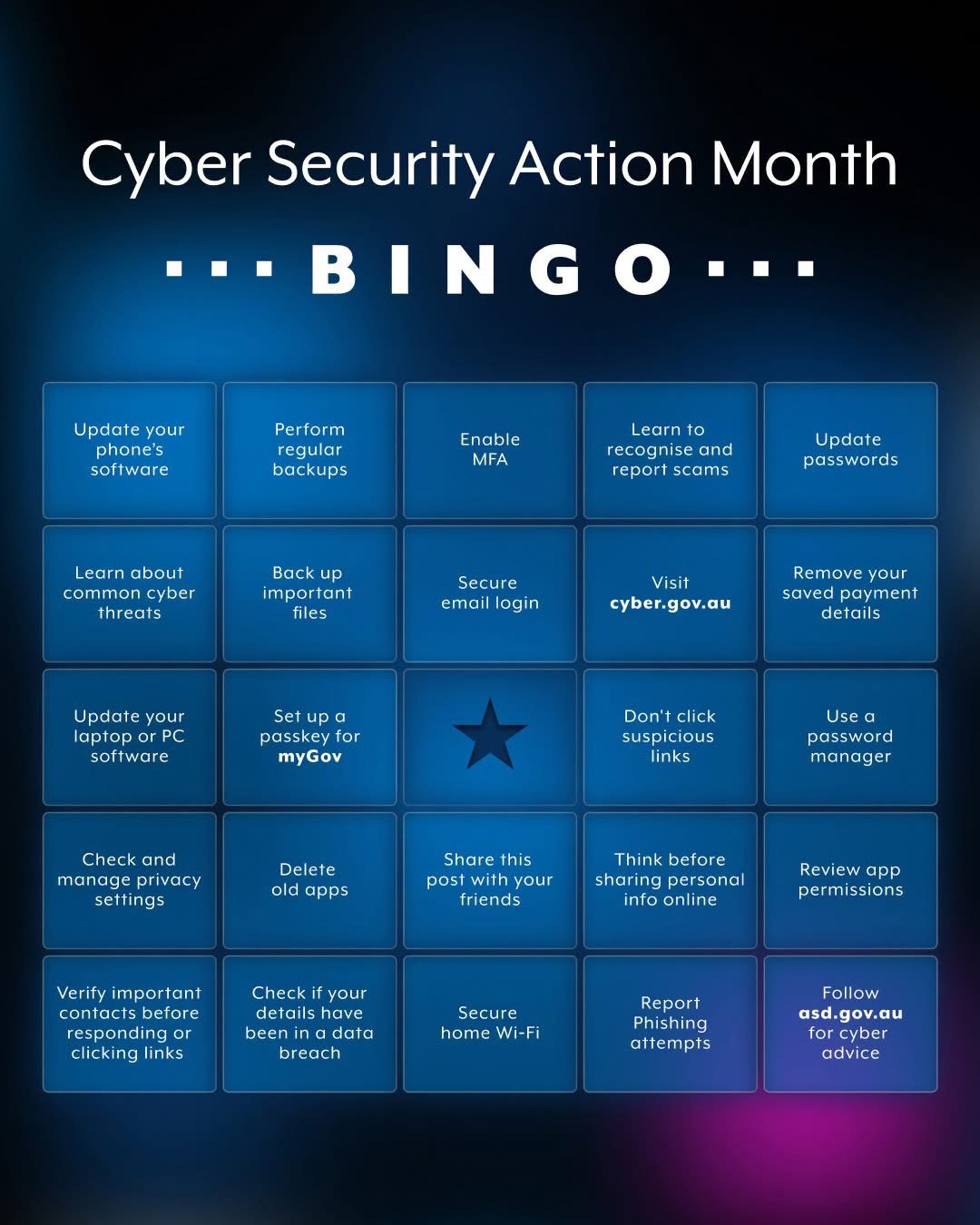
How many of these can you tick already? How many more can you tick off before the end of October?
| Topic | Requested by | Expected date |
|---|---|---|
| Zoom session recording for last session (08/10) | ||
| Member Wizard: We will discuss the enrolment process in class. No need to book for an extra session. | 15/10/2026 | |
| Scams: Note the Cyber Security Bingo card! How many of these can you tick already? How many more can you tick off before the end of October? Run Cyber Security checkup – here’s mine | 15/10/2026 | |
| Security: Windows “Patch Tuesday (Wednesday)” for October fixed 1417 common vulnerabilities and exposures (CVEs) of which 76 were rated critical. | 15/10/2026 | |
| Security: New iOS27 is now available. It integrates AI much more than previously. Should you “upgrade” – is your phone supported or end-of-life? Android end-of-life You can turn off AI features on iOS27. Does “upgrading” affect any apps/software you use? Note: Android 12 and above use Google Gemini, but not all phones have all features. You can turn off AI features on Android. | 15/10/2026 | |
| iPad: YouTube videos not loading after an iOSiPad update – what to do? | Joyce | 15/10/2026 |
| Privacy: McAfee Scam Protect requires access to Gmail. Is this a privacy issue? ChatGPT’s answer | 15/10/2026 | |
| iPhone/iPad: a new photo backup option – Parachute Backup. | 15/10/2026 | |
| Update – AI “Homework” – any more news? | ongoing | |
| Security – PassWORDS, PassKEYS, and Windows Hello PassCODE. Clearing unused passKEYS off MyGov. Did you add a Passkey? | ongoing | |
| Using AI – AI hallucinations in a legal case were a complete fabrication | Christine | |
| Using AI – How safe is it to use Meta’s open weight AI models? | Christine | |
| Using AI – Generative AI vs Predictive AI vs Agentic AI | ||
| Using AI – how to monetise your knowledge or skills | ||
| Privacy – Surveillance pricing | Christine | |
| Privacy – Do VPNs improve your privacy? Difference beetween VPN packaged with antivirus and a Premium version. | Christine | |
| Privacy – future Aus laws allow people to “remove data” from online. Do data removal services work? AskLeo article | Christine | 10/09/2026 |
| Privacy – Are our cars spying on us? | ||
| Privacy/Security – Share a link rather than a document – is using the “cloud” safe? (AskLeo articles) | ||
| Security – How long should a password be? AskLeo article | ||
| Security – 2FA – why it’s important, what if you lose your 2FA device? Macquarie 2FA backup | 10/09/2026 | |
| Security – Changing your Windows PIN | ||
| Security – AI stealing fingerprints | ||
| Travel – eSIMS – what they are and how to choose one | ||
| Facebook login | Christine | |
| AI is being used more by scammers. People can learn to spot AI faces – but the clues are no longer obvious | ||
| Where is stuff stored? | ||
| AI – ongoing – exploring topics – AI images & speed, changing passwords, privacy concerns – AI settings, computer and phone settings | 21/05/2026 | |
| “Advanced data protection” setting for iCloud | 21/05/2026 | |
| Using AI to check the validity of a site | 30/04/2026 | |
| Find lost Android phone | Yoko | 21/05/2026 |
| OneDrive – warnings | Yoko | 07/05/2026 |
| Passkeys – what they are, how to create one, how to login with a passkey on a different device see AskLeo’s video | ||
| Password Managers – Are passwords in password managers stored securely on your devices? TPM (Windows), TEE (Android) secure enclave (Apple). How secure are password managers using cloud storage? Apple Keychain – how Apple passkeys are shared across devices, etc. Are passkeys deleted when you reset to factory settings? | 19/03/2026 | |
| Google wants to change my Gmail location to California! | ||
| Robots – another fast moving technology – see XPENG IRON vs Tesla Optimus | ||
| Download your photos from your iPhone or Android phone (with or without cloud storage) | ||


Topics by week
| Week | Date | Topics |
|---|---|---|
| 1 | 05/02/2026 | Security Audit. See slides: Colour version Print version |
| 2 | 12/02/2026 | Passkeys – what they are, how to create one, how to login with a passkey on a different device. See AskLeo’s video |
| 3 | 19/02/2026 | – Gmail is removing the ability to check email from external accounts – Microsoft Teams scam email similar to this scam – Microsoft Windows “zero day” vulnerabilities – “Patch Tuesday“ – Microsoft Secure Boot certificates to expire in June – Password manager concern |
| 4 | 26/02/2026 | NO CLASS – Committee Meeting |
| 5 | 05/03/2026 | – Passkeys – what they are, how to create one, how to login with a passkey on a different device see AskLeo’s video – Is Google Password Manager safe on an iPhone or a Windows computer? – https://www.lifewire.com/is-google-password-manager-safe-7557883 – Windows Hello – what it is (link to pdf notes) and how to sign in. See https://www.wikihow.com/Set-Up-Windows-Hello-for-Sign-in-Windows – be careful about Step 6 – the option to force Windows Hello sign-in – you may want to discuss the pros and cons first. |
| 6 | 12/03/2026 | – Scams – “spoofed” email address or email “hacked”? – Using Apple password manager on a Windows computer and how secure is Apple Password Manager? – Apple Keychain – how Apple passkeys are shared across devices |
| 7 | 19/03/2026 | – Scams – “Tai Chi” scams – What topics to cover in (a) Q&A (b) face-to-face classes – please email suggestions! – Password Managers – Are passwords in password managers stored securely on your devices? TPM (Windows), TEE (Android) secure enclave (Apple). How secure are password managers using cloud storage? Apple Keychain – how Apple passkeys are shared across devices, etc. – VPNs – what are they useful for? Do they provide any protection against viruses, malware and hacking? Do they slow down the device they are installed on? See VPN colour slides – How to add Zoom meeting to Outlook calendar |
| 9 | 26/03/2026 | NO CLASS |
| 10 | 02/04/2026 | – Anti-virus software – what do you need on … Windows 11? Android? iPhone? – see AV-test.org – Backing up – photos, emails Download your photos – colour slides Download your photos – greyscale handouts |
| TERM BREAK | ||
| 1/T2 | 23/04/2026 | – Is Chrome an insecure browser as claimed in https://www.youtube.com/watch?v=vl8amukslUQ? – Will Microsoft discontinue selling Office as a once-off purchase? See https://www.pcworld.com/article/2269136/microsoft-office-2024-release-subscription-one-off-purchase-windows-10-support-price.html Note: This is not the same as Microsoft discontinuing store-based office apps. Store-based office apps are UPDATED from the Microsoft store (rather than the Microsoft Content Distribution Networks) and this process is being discontinued. See this article for more: https://windowsforum.com/threads/microsoft-discontinues-store-based-office-apps-what-you-need-to-know.374371/ –AI – what is a Large Language Model (AKA AI)? – colour slides – handouts |
| 2/T2 | 30/04/2026 | – Am I breached? Unexpected logins and 2FA code – Kaspersky subscription issue (Rob T) – How to save money on petrol – use apps – Extra privacy functions on iOS26+ – Call screening – Message filtering – iOS 26.5 coming out soon – AI – How do answers differ between AIs? Prompt “List the most important security settings on iPhone for seniors” ChatGPT Perplexity Claude Revised prompt on ChatGPT – How to write good AI prompts |
| 3/T2 | 07/05/2026 | – Zoom AI recorded the session and provided a summary including a list of action items – Scams – IDCare on Superannuation scams, BitDefender AI scam detector, Norton AI scam detector – Browser issues – Firefox v150 doesn’t view image galleries correctly, passwords stored in Edge in plain text – AI – ongoing – exploring topics – is Google password manager safe, – How should we deal with the cybersecurity threat posted by Anthropic’s Mythos? Perplexity’s answer |
| 4/T2 | 14/05/2026 | – The Zoom AI summary was useful, so we ran it again this week. See the summary produced. |
| 5/T2 | 21/05/2026 | – Zoom AI recorded the session and provided a summary including a list of action items – Member Wizard intro – AI – is Apple password manager safe, AI images – VPNs – what are they useful for? Do they provide any protection against viruses, malware and hacking? Do they slow down the device they are installed on? See VPN colour slides – pop-ups on phone, particularly from games such as Solitaire – BEWARE! Block popups in Safari – Audio file storage locations |
| 7/T2 | 04/06/2026 | – Zoom session recording for last session (21/5) – see summary – Scams – data breach warnings I received today – not my data? – Truyu app – credit checks now happening – Emerging Tech in Online Banking Security – Mythos about Mythos (AskLeo), also Mythos preview available in Australia – How to change your router password – AskLeo version – colour slides for viewing online – print version (2 slides per page) |
| 8/T2 | 11/06/2026 | – Zoom session recording for last session (04/06) – looks like I didn’t record it – sorry! – Scams – PayPal scam – Google – New privacy settings for Search services – note that Google will save more of your data from searches. – Confusing Gemini email – AI image in our latest newsletter – Cost of generating that image – Stripped to the Bone: What AI Is Really Costing You |
| 1/T3 | 16/07/2026 | – Zoom session recording – see summary – Member Wizard – feedback. Check screen layout on phones – Responsive design – how websites resize the screen to fit. your device – Security – tracking pixels are not a scam but be aware (covert user tracking on health sites) – Windows Update – “Patch Wednesday” has a very large numer of patches – Windows 10 – basic security support is being extended for another year(thanks to AskLeo for the pointer) |
| 3/T3 | 30/07/2026 | – Zoom session recording for last session (16/07) had errors. I have tracked some changes, but not checked the whole document. – I forgot to turn it on this week! Here are my notes – How to turn on track changes in Word – right click in the bottom task bar and tick “track changes” – AusAlert – did you get the alarm? Where to give feedback – Where to find what Android version you have – Using AI – “Homework” – did you manage to create an image? If you did, were you happy with the results? Could you improve your prompts? Alfred and Herman have submitted versions. – Credit reporting – Tryu app now offers blocking changes to credit reports. Also can tell you the actual passwords in a data breach! Credit reports are available every three months for free – see notes. – Facebook login |
| 4/T3 | 06/08/2026 | – Zoom session for 30/7 is missing – I forgot to turn it on! – YouTube issues – Using YouTube free – Replacing an iPhone battery – how to prepare, do you need id – Using AI – “Homework” – Alfred improved his image. We did a group AI image with several iterations to improve it. – Identifying AI – AskLeo used Claude to write an email – would you pick it as AI? An interesting comment on “The uncanny valley”. We discussed the email and asked ChatGPT if it was AI generated then got it to create an Australian version which was much better. – Security – Credential stuffing – what it is and how to protect. yourself, what to do after a data breach, credit rating agencies |
| 5/T3 | 13/08/2026 | – Zoom session recording for last session (06/08) – Using AI – AI pollution (content degradation) and AI slop – Using AI – Generative AI vs Predictive AI vs Agentic AI – Internet connection unstable – why and how to fix. |
| 6/T3 | 20/08/2026 | – Zoom session recording for last session (13/08) – Access lost to U3A Nunawading website on Thursday 20 August – reason not known. – Incorrect enrolment in History – unlikely to be a scam or “hacking”, more likely human error. Good idea to change the password to a stronger one though. – Internet connection unstable – why and how to fix. Ethernet connection seems to make an improvement. – iPad – how to close tabs in a browser, how to use tab groups – Browsers (eg Chrome, Firefox) – how to clear browser cache and why – Browsers (eg Chrome, Firefox) – how to turn OFF offer to save passwords – Browsers (eg Chrome, Firefox) – “private browsing” doesn’t save your history on the local device but doesn’t stop websites from tracking you. – Passkeys – can be shared across devices – more to come. |
| 7/T3 | 27/08/2026 | – Zoom session recording for last session (20/08) – Update – what happened to our website last week (the virtual host hookup table was corrupt) – Scams – “Hey Mum” scam – Privacy – K-Mart Anko glasses – other opinions on smarglasses also protect yourself, sbs comment including laws, the app for Kmart glasses Chinese factory workers caught on glasses AI-powered glasses help disabled – Security – PassWORDS, PassKEYS, and Windows Hello PassCODE |
| 8/T30 | 03/09/2026 | – Zoom session recording for last session (27/08) – Scams: nbn “check” scam – Security – PassWORDS, PassKEYS, and Windows Hello PassCODE. Clearing unused passKEYS off MyGov. Did you add a Passkey? – Privacy – Is there a data limit on Norton VPN? – Security – Telstra fined for allowing SIM swapping – Security – locking apps on your phone – Windows – how to find files easily |
| 9/T3 | 10/09/2026 | – Zoom session recording for last session (03/09) – Scams: BeConnected has a session on scams and also sessions on other useful topics – Privacy – SmartGlasses – how to protect yourself – Security – 2FA – why it’s important, what if you lose your 2FA device? Macquarie 2FA backup |
| TERM BREAK | ||
| 1/T4 | 08/10/2026 | – Zoom session recording for last session (10/09) – Member Wizard: add a bookmark to your browser – computer and phone – Scams: Note the Cyber Security Bingo card! How many of these can you tick already? How many more can you tick off before the end of October? – Security & Privacy: New iOS27 is now available. It integrates AI much more than previously. — Should you “upgrade” – is your phone supported or end-of-life? — You can turn off AI features on iOS27. — Does “upgrading” affect any apps/software you use? — Note: Android 12 and above use Google Gemini, but not all phones have all features. — You can turn off AI features on Android. – Security: “My password manager only asks for my 6-digit PIN to open. This can’t be safe!” How Windows Hello works … |
| 2/T4 | ||
Bottom of page