
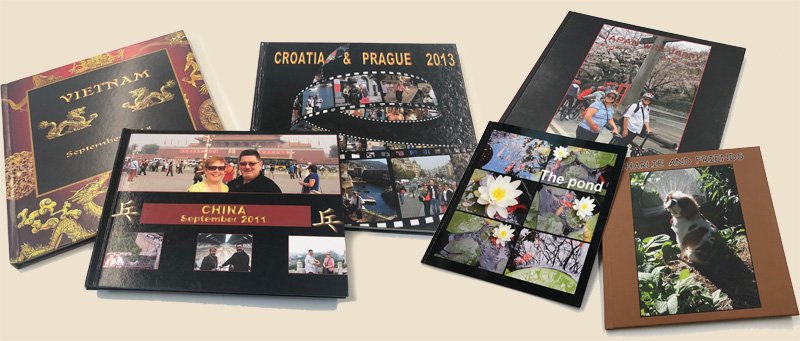
Term 4 computer classes are now available for enrolment. At the Hub we have photo book making classes – great for Christmas gifts, a short course on travelling with your smart device, and a single session to update you on the most common current scams. And to prepare for “Get Online” week, there’s a single session to help you overcome your nerves and find your feet in the online world with whatever devices you may have available.
Zoom classes include the return of the photo-editing class and a single session on maintaining your privacy online.
This month’s scam alert – beware of emails and messages that appear to be from friends but contain little more than a link.
Face-to-face classes at the Hub
Make a photo book
A photo book is a beautiful way to show off your photos to friends and family. It also makes a wonderful gift.
In Term 4 we are offering not just one course in photo book making, but TWO! Choose either class to learn how to use photos from your computer, camera, or smartphone to create your very own personalised photo books. You can choose a wide range of formats from customised fun mini-books to large art books with user-friendly software you run on your own computer.
Choose either a Wednesday or Thursday class where you will be guided through the process. You will need to bring your laptop to class – the software used in either class is not suitable for iPads, tablets or smartphones. You will also need to be confident in using your computer.
- 22COM405: Making a photo book using Albumworks (Wed) – 5 weeks from 19 October
- 22COM403: Learn how to make a photo book (Thurs) – 6 weeks from 6 October
Travelling with your smart device
Your favourite smart device, whether a phone or a tablet, can be a really useful resource while travelling. This short (3 week) course explores a range of Apps for both Apple and Android devices that can help you: plan your trip, navigate unfamiliar places, keep track of your spending and keep a record of your adventures, among other things.
- 22COM409: Travelling with your Smart Device – 3 weeks from 18 October
Get online!
October 17 to 21 is Get Online week! Are you nervous about getting online? There are so many benefits to being online, particularly as we get older and less mobile. Join this class to explore some of the online activities that can make your life richer and keep your mind active and actually make you more secure.
- 22COM407: Get Online – single session on 12 October
Scams
Scammers use all types of sneaky tactics to trick you into parting with your money, but knowing what to look out for can help you to spot the signs. In this session, we’ll share examples to illustrate these sneaky tactics and draw some general rules for keeping safe from scams.
- 22COM413: How to Spot a Scam – single session on 15 November
Short courses on Zoom
Photo editing
Make your photos pop – get them ready for a photo book, a print or just to share online. The popular photo editing class returns for Term 4 to show you how to use free software to modify, enhance and bring out the best in most of your collection of photos.
- 22COM401: Photo Editing (Term 4) – 6 weeks from 4 October
Privacy online
Concerned about how much you are tracked online? Wondering how to protect your privacy on social media? This session will give you some strategies to manage your online privacy.
- 22COM411: Privacy Online – single session on 27 October
Ongoing courses
- 22COM013: Questions and Answers (on Zoom) – This course is open for new enrolments anytime.
- 22COM205: Computer-Basic, Internet and Email (at the Hub) – this course continues. No new enrolments for Term 4.
Scam alert for the month
Got an unusual email or message from a friend or relative? It may not be from them at all!
Email messages with links
A common scammer trick is to send an email that looks like it comes from one of your friends with a link, often to photos. Here are a couple of examples, but there are lots of variations.

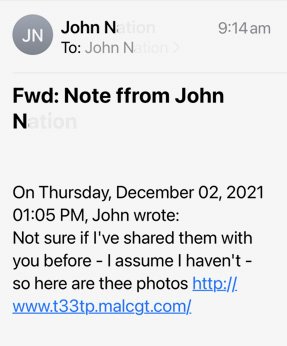
The message is NOT from your friend and they probably haven’t been “hacked”. The scammers use people’s names to cover an email address that is completely unrelated. Notice the message doesn’t mention YOUR name anywhere.
Here’s what to do:
- DON’T click the link – you will probably get malicious software (malware) downloaded to your computer.
- DO check the actual from email address if you know how. The Scams session on 15 November will show you how.
- DELETE THE MESSAGE – there’s no point in blocking the sender since these messages will come from a different address each time.
Text message from a family member – “Hey Mum” scam
A scam that is particularly common at the moment involves text messages (SMS or WhatsApp) that appear to come from a family member – a son, daughter or, as in the example below, a parent. The messages usually indicate that the family member has changed phones so the messages may come from a different phone.
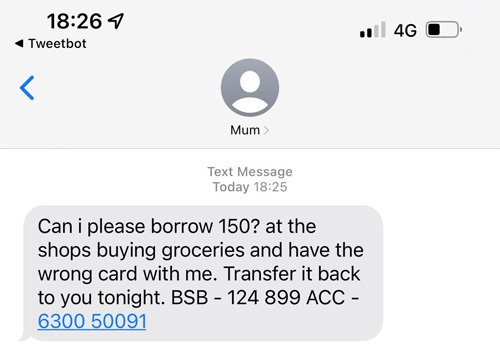
Here’s what to do:
- Contact the family member using your NORMAL method such as the phone number you normally use – chances are they’ll know nothing about it.
- DON’T respond to the message, just DELETE it.
More information
For more information on scams and how to protect yourself:
- Go to Scamwatch (https://www.scamwatch.gov.au/)
- Use the training at Be Connected (https://beconnected.esafety.gov.au/)