
You can now translate our website into Arabic, Chinese (Simplified or Traditional), Hindi or Vietnamese. Here’s how to do it.
On a computer or tablet
1. Click or tap the Translate button in the menu.
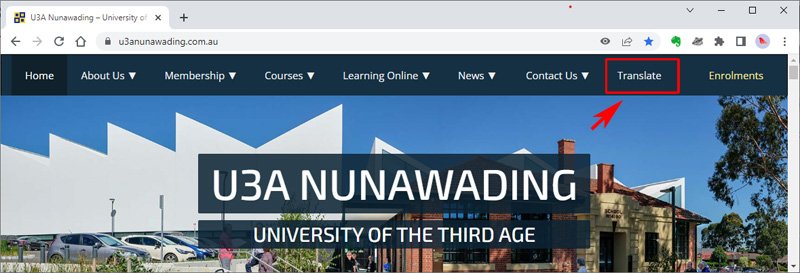
This will take you down to the bottom of the page
2. Select your language from the language dropdown

You will then see the site translated (using Google Translate) into your selected language.
3. You can return to English using the buttons at the top of the page

Note that this is currently difficult to achieve on a phone because of the size of the menu. We’ll attempt to fix this as soon as possible.
On a phone
1. Open the menu and tap a page other than the home page
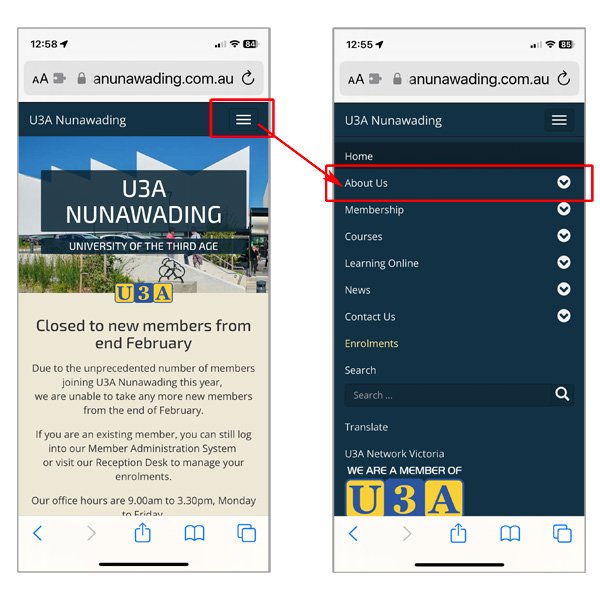
2. Scroll down to the bottom of the page to find the language selection box

Tap your preferrence. You will then see the site translated (using Google Translate) into your selected language.
3. You can return to English using the buttons at the top of the page
