
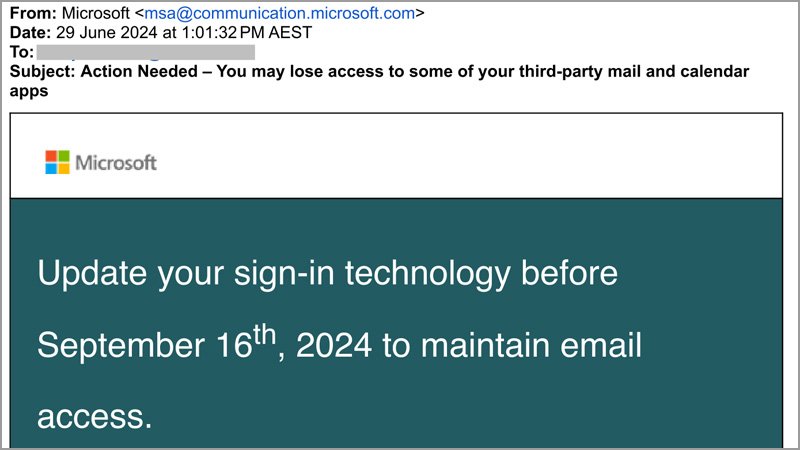
Many of our members are becoming very good at identifying scam emails and texts, particularly when it mentions Microsoft or other big tech names. But sometimes you can mistake a real email or text for a scam and miss important information.
The image above is from a “real” email. Yes, it really is from Microsoft and it is important information for those people who:
- have a Microsoft email account, such as hotmail, live.com or outlook.com
- use a non-Microsoft app to read their email, such as iPhone mail app, or a very old Outlook program from the Microsoft Office suite.
You would only have received this email if Microsoft detected that you might have an issue. But you may have deleted the email thinking it was a scam.
If this does apply to you, you may lose access to your emails after 16 September, 2024.
Does this apply to me?
This only applies to people with Microsoft email accounts. That is, an email address with one of the following after the @ sign:
- hotmail.com
- live.com
- outlook.com.
So if you only have a gmail address or a Bigpond or Optus email address you can safely ignore this issue.
I have a Microsoft account, what next?
Even if you have a Microsoft account, this may not be an issue.
You SHOULDN’T have a problem if you read your emails in one of these ways:
- using the built-in Windows mail program OR
- using an Outlook app on your phone or tablet
- using your browser (eg Chrome or Edge) to login to your mail account online.
You MAY have a problem if you use a non-Microsoft app or even some Microsoft programs to read your emails. Some of these include:
- iPhone (and iPad) Apple Mail app
- Old versions of the Outlook Desktop program
- Outlook for Windows* configured to use only a username and password to login
- Mozilla Thunderbird
Why is it a problem?
Microsoft is changing the way you login to your mail account. From 16 September they will only accept “Modern Authentication”. Your email program may have been setup in the past to send your username and password to login and this will no longer work after 16 September.
What could happen?
Before 16 September you may get recurring password prompts, but you should be able to access your emails.
After 16 September, if you are using the old-style authentication you will not be able to read your emails without “Modern Authentication”. However, your emails will still be held on the mail server, so you won’t lose the emails, just not be able to read them.
What do I need to do?
In many cases, it’s just a matter of removing your email account from the app or program and adding it back again, making sure that you choose Outlook.com as the way to connect. See the following page for detailed instructions:
If you still have problems, keep a lookout for the return of Appy Hour at U3A Nunawading – coming soon.
Helen Smith
Computer class leader