
From 9.00am Monday 28 November current members can enrol in 2023 general classes and Summer School.
Here’s a reminder about how to enrol online!
1. Navigate to the enrolment system (UMAS) and login
- Click the yellow Enrolment button at the top right-hand corner of our website homepage u3anunawading.org.au to go to the Member Administration System.
- Click the Login link on the left side menu.
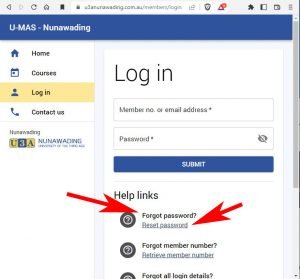
- Login with your membership number or email address and password.
If you have forgotten your password you can request a temporary one from the login page of the member administration system (UMAS). [See image] - Please confirm your phone number/s, email address and Emergency Contact details are all correct.
- If not, click Edit Member Details, make the changes you want and then press SAVE.
2. Choose your courses
- Click the Courses link in the left side menu and navigate to the courses you want.
HINT – Use the FILTER to show only the categories of courses you are interested in or or to search for a specific course code. - To select a course, click the course name in the list to open up the course details, and then click the Add to Cart button at the bottom of the course detail.
- Your 2023 subscription fee of $50 will be added to your cart automatically when you add the first course.
- When you have finished selecting courses, click the Checkout button in the left side menu. When you see the Checkout success message you are enrolled.
Limits apply for initial enrolment
- Initially you can only select five courses. This will be raised to 10 on 5 December and you can go online again and make further selections.
- Computer courses, Summer School, Forums and selecting to Volunteer are not included in your first five choices.
- Some Class Leaders request all members be put on a waitlist as acceptance into their class is based on skill level or the class is continuing from 2022, for example. Don’t be concerned if you are initially placed on a waitlist.
3. Pay your subscription
Once the checkout process is complete, your invoice will be displayed.
Paying online: You can pay immediately using the PayPal button displayed on the invoice. Note that you can use a credit or debit card to pay via PayPal, even if you don’t have a PayPal account.
Paying at the office: Please do not come in on Day One of enrolment (28 November) as the Office will be very busy with face-to-face enrolments. You can pay at the office any day from 29 November to 9 December or between 9 and 20 January during Summer School. You can pay by cheque, debit or credit card. No cash is accepted.
Need more help?
See our Membership Instructions & Help page
Enrolling in person
This year you will be able to enrol in person at the office if you cannot enrol online.
The office will open at 8.30am on Monday 28 November and your enrolment will be processed face-to-face when enrolments open at 9.00am. You will be given a number on arrival and assistance will be available if you have trouble completing your enrolment form.
Please ensure you wear your U3A name badge if you come to enrol at the Hub.
Masks
Due to the current surge in COVID-19 cases, you are encouraged to wear a mask if you come to the office to enrol.
Key dates to remember
- 28 November – Enrolment opens for current members
- 30 November – Enrolment opens for new members
- 5 December – General class limit lifted from 5 to 10
- 9 December – Office closes
- 9 January – Office opens
- 10 – 19 January – 2023 Summer School
- 20 January – Office closes
- 30 January – Office opens
- 6 February – Term 1 2023 begins
Our office hours are 9.00am – 3:30pm Monday to Friday.