
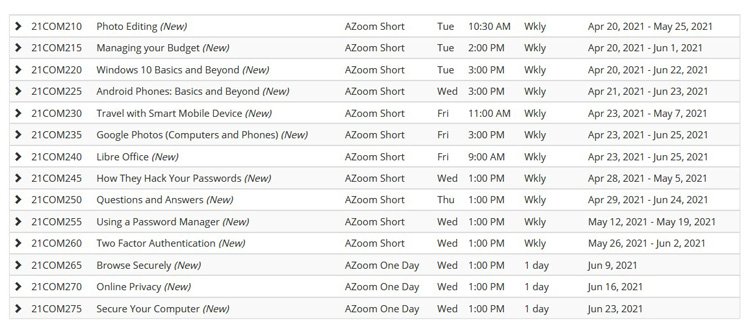
Computer classes for term 2 are now available for enrolment. All computer classes will continue to be held on Zoom, which we’re finding works well. Everyone is in the front row on Zoom!
Zoom links for the class are sent to accepted members close to the start of the class and no later than the day before. This way they’re not so easily lost in your email history.
Need help with Zoom? Our Zoom Resources page has guides you can download. Or let the office know you need help and our support people will be in touch.
Download the Term 2 Computer Course Guide or view and enrol at https://u3anunawading.org.au/members/courses
New for term 2
- LibreOffice – a free (open source) and powerful office suite used by millions of people around the world. It has a clean and intuitive interface with many feature-rich tools, making it both a powerful and easy to use alternative to Microsoft Office.
- Question and Answers – weekly sessions attempting to answer your questions about issues with your Windows computer and its software, iPhones and iPads. Enrolment doesn’t commit you to attending each week – there will be a noticeboard where the topics planned for each session can be viewed. You can pick and choose as you like.
Security topics for term 2
One or two-week sessions on the following topics:
- How they hack your passwords – learn why you really do need a separate strong password for each account
- Using a password manager – how to remember your strong passwords securely
- Two-factor authentication – make your online accounts more secure
- Browse securely – what settings in your browser you should change to increase your online security
- Online privacy – how to protect your privacy online and the compromises you may be willing to make for convenience
- Secure your computer – strengthen your computer’s defences against malicious software.
Favourites returning
- Photo editing
- Google photos for both computer and phone
- Managing your Budget with GnuCash (free software)
- Windows 10 Basics and beyond
- Android phones
- Travel with your smart mobile device
Continuing classes
- Share trading (21COM000) and Excel for shares (21COM015) are continuing through term 2.
- Genealogy using Computers (21COM019) is also continuing but willing to take new members.